
Welcome
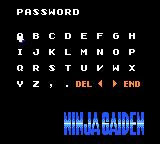
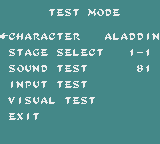
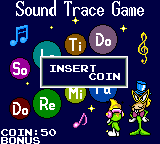
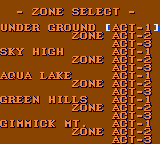
Press button 1 sixteen times on the Ninja Gaiden title screen, and a password screen appears that the game has never mentioned. Hold five buttons during the Sonic 2 intro, and you can go to any zone. Type CHEATMOD into Marko’s Magic Football, and it does exactly what it says. Open up the ROM for Jungle Strike, and you find the start-up settings of a developer’s PC, preserved by accident for 30 years.
Game Gear cartridges are full of this sort of thing. Developers added cheats to test their games and then left them in. Programmers signed their work in places no player would look. ROMs were built in a hurry, and whatever was in the computer’s memory went along for the ride.
This guide goes through a collection of 233 files, game by game. Claude, an AI model, went through every ROM, using automated tests in an emulator and reading the code by hand wherever something looked interesting. The results were then compared with what is already published online. Some of what turned up is well known. Some of it may be new.
Later runs added things to see and hear: the sounds each game’s own sound code can play, what the games show on a Japanese console, and what a Game Gear hides at the edges of the screen.
Where to start: try the ten secrets below, then look up your favourite game in the A to Z. If you want to see what may never have been written about before, go to Possible new finds.
Ten secrets to try first
- Ninja Gaiden: the screen the game never mentions. Press 1 exactly 16 times on the title screen, then Start. Enter MONTY for the staff roll.
- Tempo Jr.: two hidden mini-games. On the title screen, press Up, Right, Down, Left, 1, 2, 1, 2, then Start. A whole extra game called Sound Trace Game begins.
- Aladdin: the developers’ test menu. The same eight presses on Aladdin’s title screen open a stage select, a sound test and a character viewer.
- Sonic the Hedgehog 2: go to any zone. During the intro, hold Down, Left, 1, 2 and Start until Tails blinks twice. Press Start on the title screen.
- Eight Codemasters games: find out when your game was built. Hold 1 and 2 as you switch on. A smiley appears, along with the date and minute the ROM was built.
- Micro Machines 2: a whole second game. Hold Start from power-on, and the cartridge loads Squinky Tennis. You need two Game Gears and a link cable to play it.
- Streets of Rage 2: switch off damage. In Options, set BGM to 14 and SE to 21. Hold 1 and 2, and press Up.
- Taz-Mania: a debug menu. Pause, hold 1 and tap Left, Left, Right, Right. Hold 2 and tap Right, Right, Left, Left. Let go and press Start.
- Yogi Bear: a message from its makers. Two button codes and the password INFLUENCE open a hidden credits screen.
- Panzer Dragoon Mini: a password nobody was given. The game works out passwords with a formula. Run it backwards and you get AAAAVIGA, which opens STAGE SELECT.
Things to see and hear
- Sonic the Hedgehog 2: four sounds the game never seems to play. Two short effects and two tunes sit in its sound code, and nothing found in the game asks for them.
- Tails Adventures: the most sounds with nothing asking for them. There are seventeen, from tiny blips to tunes that run on and on.
- Desert Strike: an alphabet above the screen. The title screen keeps its letters and numbers in rows that a Game Gear never shows.
- Sonic Blast: another name in Japan. On a Japanese console the title screen reads G SONIC, with a large G emblem.
- Ristar: a planet with two names. On a Japanese console the first round is PLANET NEER. Everywhere else it is PLANET FLORA.
- Micro Machines 2: letters around the menu. The border a Game Gear hides is full of letter pairs and stretches of the alphabet.
- Pengo: two tunes left on the shelf. Nothing found in the game asks for them. One may be the version of Popcorn that The Cutting Room Floor says is still in the ROM.
- Crystal Warriors: skip to the ending. On the title screen press Up twice, Down six times, 1 nine times and 2 four times, then Start. The minstrel’s closing story and the staff roll play straight away.
- Zoop: an error that never happened. Among the link-cable error messages is one that admits there was no error at all: “MUST HAVE BEEN A BUG, SORRY ABOUT THAT”, signed Chris White.
- Marble Madness: a note in the spare space. The last 112 bytes of one bank hold a programmer’s note explaining that it seemed a shame not to fill them.
- Micro Machines 2: two consoles, one hidden game. With two emulators joined by a virtual link cable, the hidden Squinky Tennis plays a whole match, and ends with YOU WIN ! on one console and YOU LOSE! on the other.
- Ecco: The Tides of Time: NOT IMPLEMENTED YET. Message 0 in the dolphins’ list is a placeholder, and the message routine shows it if no other message has been picked.
- True Lies: the developers’ crash screens. The game has 36 checks for things going wrong, each naming its own problem. When one fails, the screen fills with memory and a message such as Lock up detected.
- Kawasaki Superbike Challenge: TRACK LEN ERROR. A check on the track data has its own error screen. The finished tracks never trip it, so it was seen by forcing it.
- Star Wars: the scene list. With the title-screen code, the Continue screen names the level you will play. The names run from INTRO SEQUENCE to CEREMONY NEAR, and four slots are called UNUSED.
- Dr. Robotnik’s Mean Bean Machine: the sound test. A working sound test with a bean for a cursor. The password Yellow, Red, Blue, Has Bean opens it, and the guide explains why nothing seemed to lead there.
- GP Rider: a road made of 66 slices. To bend the road, the game shifts the picture by a different amount on 66 lines of one frame, the most in the collection.
- Halley Wars: sound that moves. Put on headphones. The game pans its sounds between the left and right speakers more than any other Game Gear game tested, with 22 different settings.
- Ultimate Soccer: a demo that depends on switch-on. The first demo match is picked using whatever is in memory when the console is switched on, so it can change from one switch-on to the next.
- Shinobi II: straight to the ending. Sega Retro gives EDA20 as a password, entered while holding 1, 2 and Start. It plays the ending.
Before you start
Nothing in this guide has been tried on a real Game Gear. All the testing was done in an emulator, so a code that depends on timing may need a few goes.
- Buttons: 1 and 2 are the two face buttons, and Up, Down, Left and Right are the D-pad.
- Press or hold: “press” means press and let go, one button at a time. “Hold” means keep it down until the steps say otherwise.
- Hold from power-on: hold the buttons first, then switch on.
- If a code does nothing: most codes only listen on one screen, and a wrong press usually resets them. Switch off, start again and take it slowly.
- Region: a few codes only work on a Japanese console. The steps say so where it matters.
- Link games: these need two Game Gears and a Gear-to-Gear cable.
Developers had favourite patterns, too. Up, Right, Down, Left, 1, 2, 1, 2 turns up in Aladdin, Fantasy Zone and Tempo Jr., and Right ×3, Left ×3, Right, Left, Right, Left unlocks a Cheats! menu in three different games. If a game has a secret you cannot find, those are good ones to try.
How to read this guide
Each game starts with a description, followed by anything the review found. Worked in testing means the secret was run in an emulator and seen to work. Some secrets say they were read in the code but not run, and those are worth trying for yourself.
Under each secret there is a small note for the technically minded, giving the address in the ROM. You can happily ignore these.
Near the end of each game is At a glance: a strip showing what the cartridge is made of, and a few facts, such as how many sounds it has, who is named in its credits and which games share its sound code. The strip runs from the start of the cartridge to the end, coloured by what each part was used for in testing. Dark grey is the part testing never reached, mostly levels the automatic player did not get to, so it does not mean unused.

Some games also have recordings to listen to. On a web page they play in place. In the Word file, hold Ctrl and click a Listen link, with the guide’s sounds folder kept next to the file.
Related articles
 Retro Games & Reverse Engineering
Nitemare-3D: When Hugo Picked Up a Plasma Gun
Hugo's fourth outing was a home-made 1994 3D shooter that beat Doom to Windows and was banned in Germany for blood it doesn't contain. The story, the tech, and a raycaster you can watch.
 Retro Games & Reverse Engineering
Hugo III, Jungle of Doom! Taken Apart: The Kindest Jungle in Adventure Games
The last Hugo adventure, from the inside: an intro made of 36 coordinates, zero ways to die, a hint system, a perspective trick made of two Hugos, and an elephant that escaped from a zoo.
 Retro Games & Reverse Engineering
Hugo II, Whodunit? Taken Apart: A Murder Mystery Told Through Its Own Game Data
Hugo's 1991 sequel, through its own data: a 64-screen hedge maze built from 16 names, a five-minute snake, flytraps that kill on contact with invisible walls, and the trick that made Penelope the hero.